
Sommie Santilla
UX + PRODUCT DESIGNER
Crafting with curiosity and compassion to make experiences connective and effortless.
UX/UI
Product Design
CLIENT WORK
CONTRACT
Expanding tool collaboration to invite educational usage
Role
Product Designer
Ideation Lead
Timeline
10 weeks
February - May 2024
team
1 PM
3 Designers
skills
User Interviews
User Surveys
UX/UI Design
Wireframing
Playbook is a visual-based cloud storage platform designed for creatives to upload, organize, and maintain files.
Over 10 weeks, I wore many hats throughout the entire partnership with Playbook on a student-led team. I focused on designing the features for new tool panel side bar as well as the activity tracking of on-file markups, voice recordings, and link attachments.
TL;DR
Diversifying Playbook's user population through design schools
Playbook wants to reach students and aspiring creatives to expand their user demographic. However, the platform has collaborative limitations within an educational space to leverage beyond its storage capabilities.
PROBLEM STATEMENT
How might we empower university students in creative fields to seamlessly collaborate on Playbook?
Solution
Introducing file annotations and expanded commenting features.
Foster a greater collaborative environment using more descriptive and specific feedback features that lean into visual and informational references.

Crop
Markup
Comment
Annotate here

Sommie Santilla
What a great idea! I love the adjustment and change, makes it more visually compelling.
On-file Markups: Canvas tools for annotations
Addition of an annotation tools with an on-file cursor and side-panel menu.
Off-file Organization: Preview
Redesign of the "Conversation Activity" when initially clicking into the file allows new users to peek into the new comments on the file before completely opening the activity.

Off-file Organization: Conversation tab
New inclusions of features such as voice, video, and link attachments. This activity is listed under the new "Conversation" Tab which can be organized by all comments, markup file annotations/drawings, and pinned comments. Toggle the visibility of on-file annotations.

Understanding the problem
Single User Basis & Limited Collaborative Opportunities
The current collaborative actions are limited to sharing/viewing files or commenting. We focused our evaluation on extending Playbook’s collaborative features to leverage this appeal within educational contexts.
Individuals wider range of actions for files they upload.
Collaborators can view or comment on files shared with them.
INDIVIDUAL
COLLABORATIVE
Organize file
Comment
Share
Crop
View Shared File
Comment
Open File
upload file
Research
We evaluated the landscape of collaboration—within education, competitor platforms, and Playbook itself.
We investigated how university students managed creative projects and collaborated with peers through four avenues of research.
Competitive Analysis
Evaluated Google Drive, Dropbox, Pinterest, and Notion as competitors within storage, workflow management, and visual display.
Screener Survey
Surveyed 43 participants to understand the celebrations/frustrations that exist within collaborative spaces.
Informational Interview
Interviewed students and professors to understand tooling and teamwork within classroom environments.
Contextual Inquiry A/B
Observed how users interacted with Playbook for the first time through creating and sharing (A) or onboarding/joining existing files and uploading themselves (B).
Takeaways & Insights
Annotation and feedback were key features for collaborative platforms.
Teachers and students alike expect a clear, accessible avenue of interacting with the work of others.
Critique & Evaluation
Commenting, annotating, or other ways of providing feedback were helpful in improving work.
Ease of Use
Intuitive tools that are easy to learn and able to provide real-time communication seamlessly.
Customized Access
Ability to customize and easily share the work with others.
Workflow Integration
Transferring work is a common concern with integrating new platforms
Ideation
Early concept ideation: Whiteboard / Presentation Mode
I proposed the ideas of annotation directly on the file, while connecting comments with the doodles.
HIGH IMPACT & LOW FEASIBILITY
HIGH IMPACT & HIGH FEASIBILITY
LOW IMPACT & HIGH FEASIBILITY
LOW IMPACT & LOW FEASIBILITY
Google Calendar Integration
Expansion of Commenting Features
Presentation mode
Expansion of Advanced Editor Tools
Sharing boards through code
Virtual Whiteboard
Integrated chatrooms based on storage
Storyboarding within Playbook
HIGH IMPACT & HIGH FEASIBILITY
LOW IMPACT & HIGH FEASIBILITY
LOW IMPACT & LOW FEASIBILITY
Google Calendar Integration
Expansion of Commenting Features
Virual Whiteboard
Presentation mode
Expansion of Advanced Editor Tools
Sharing boards through code
Integrating chatrooms
Integrated chatrooms based on storage
Storyboarding within Playbook


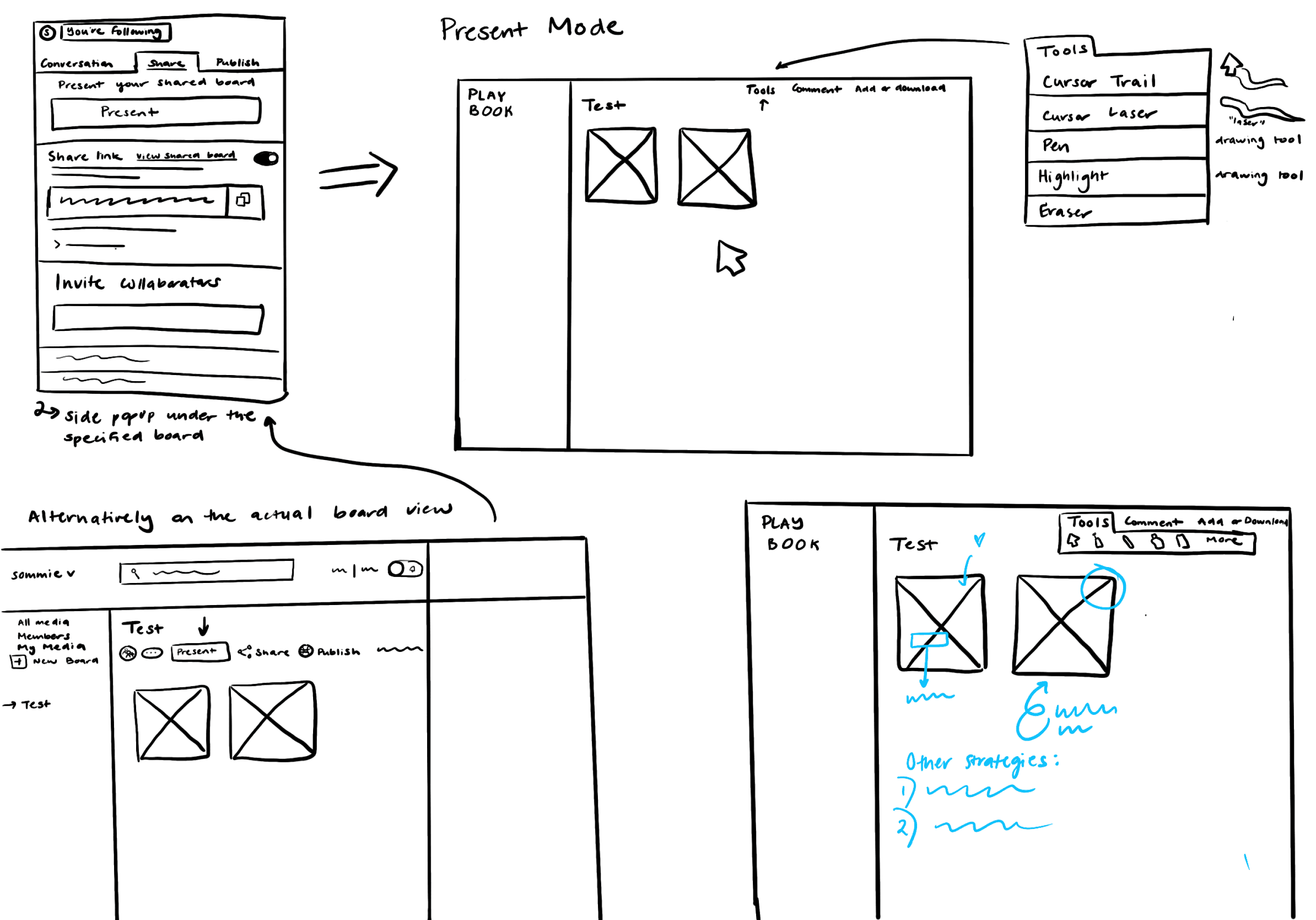
Early concept ideation: Whiteboard / Presentation Mode
Further development of this idea with my teammates led to a more detailed file annotation system and expansion of the current commenting capabilities. We explored:
markup tools size custom
markup tools color select
Voice/video comments
Link attachments
Toggle visibility
comment/annotation organization

user flow
On-file Annotations vs Off-file Organization of Activity
In order to organize our deliverables and better visualize the flow of expanding editor tools, we envisioned two paths: editing files directly (On-file Markup) and supplemental commenting features on the side panels (Off-file Markup).
Making annotations to the file/canvas directly through the use of shapes, lines, pen tool, eraser, etc

Providing feedback within the sidebar through video/voice recordings or comments (text, link, file, threads)

REFLECTIONS
My learnings
01
Scope evolves, lean into it
Adapt to changes in the project scope, such as cutting out external software integration, due to stakeholder priorities and lean into the specificity that we honed in on.
02
Iteration informs prioritized flows and features
Consider edge cases and evaluate about how features may look across different user touch points rather than diving straight into design explorations and focusing on only one instance.

ദ്ദി・ᴗ・)✧
ദ്ദി(˃ ᵕ ˂ ദ്ദി)
•ᴗ•
•ᴗ•
•ᴗ•

✦ FINAL WORDS
Thank you Playbook!
As my first ever UX consulting project with a company and insight into industry, I was extremely grateful and humbled by the flexibility and support that I was given through the mentorship of my team.
Special thank you to Andrea J. from Playbook for the constructive feedback and providing us a site tour in San Francisco!