
Crop
Markup
Comment
Annotate here
UX/UI
Product Design
CLIENT WORK
CONSULTING PROJECT
Expanding tool collaboration to invite educational usage
ROLE
Ideation Lead
Product Designer
CONTRIBUTIONS
User Research, User Personas, Designing
TIMELINE
February - May 2024
TEAM
Adi M | PM
Eric W | Designer
Andie B | Designer
Miles D | Designer
INTRODUCTION: WHAT IS PLAYBOOK?
“Dropbox meets Pinterest”
Playbook is a visual-based cloud storage platform designed for creatives to upload, organize, and maintain files. Playbook partnered with my team at Berkeley Innovation to investigate how we can effectively reach out to and establish partnerships with design schools.
Free storage capacity for educational plans

2 GB

5 GB

15 GB
4000 GB / 4TB
context
The majority of Playbook users are professional creatives.
Our goal was to reach and appeal to students before becoming professionals: as aspiring creatives who can carry their work beyond their educational institutions. With this partnership, students access 4TB storage for free using their .edu emails to upload, organize, and maintain files--whether for storage, class submission, or for building a portfolio.
current path
Young student
Professional
Playbook creative
target path
Young student
Playbook creative
Professional
✦ PROBLEM
Single User Basis & Limited Collaborative Opportunities
Because critique and teamwork are central to learning design and art--as they mirror the collaborative demands that students will face in professional practice--we focused our evaluation on Playbook’s collaborative features to leverage this appeal within educational contexts like classroom usage and assignment submission.
BEFORE SCREENS



Initial click into the file: limited preview of comments
Individuals are able to edit uploaded files through comment, crop, or sharing externally.
Collaborators are able to view or comment on files shared with them.
INDIVIDUAL
COLLABORATIVE
Organize file
Comment
Share
Crop
View Shared File
Comment
User flow: Individual vs Collaborative Actions on Playbook
Open File
upload file
PROBLEM STATEMENT
How might we empower university students in creative fields to seamlessly collaborate on Playbook?
✦ RESEARCH
We evaluated the landscape of collaboration--within education, competitor platforms, and Playbook itself.
We investigated how university students managed creative projects and collaborated with peers through four avenues of research.
Competitive Analysis
Evaluated Google Drive, Dropbox, Pinterest, and Notion as competitors within storage, workflow management, and visual display.
Screener Survey
Surveyed 43 participants to understand the celebrations/frustrations that exist within collaborative spaces.
Informational Interview
Interviewed students and professors to understand tooling and teamwork within classroom environments.
Contextual Inquiry A/B
Observed how users interacted with Playbook for the first time through creating and sharing (A) or onboarding/joining existing files and uploading themselves (B).




56%
of students cited inefficient communication as a collaborative pain point
“I like the flexibility of tools like Notion ”
Student, Contextual Inquiry B
“I see this as a pretty strong collaboration tool for sure. ”
Student, Informational Interview
“Engaging directly on the canvas seems pretty intuitive ”
Student, Informational Interview
“Classroom usage of tools has a large learning curve ”
Professor, Intro to Photoshop/Illustrator
It’s not always clear where I should be looking.”
Student, Informational Interview
We utilized various channels such as posting on the Playbook Instagram, online platform sharing, and word-of-mouth
“My students struggle with finding tools and overall workspace navigation.”
Professor, Intro to Photoshop/Illustrator
“I want to be able to share and engage in group critiquing. ”
Student, Informational Interview
“Uploading files and organizing them felt easy and intuitive”
Student, Contextual Inquiry A
“I usually use their commenting features when viewing other’s work.”
Student, Contextual Inquiry B
“Playbook’s large storage drive and visual-based interface is what motivates me to continue using it.”
Student, Contextual Inquiry B
✦ TAKEAWAYS & INSIGHTS
Annotation and feedback were key features for collaborative platforms.
Teachers and students alike expect a clear, accessible avenues of interacting with the work of others.
CRITIQUE & EVALUATION
Commenting, annotating, or other ways of providing feedback
EASE OF USE
Intuitive tools that are easy to learn and able to provide real-time communication
CUSTOMIZED ACCESS
Ability to customize and easily share the work with others
CREATIVE WORKFLOW INTEGRATION
Transferring work is a common concern with integrating new platforms
Setting the design context: Collaborative Caleb seeks feedback on work and showcasing projects.
Given the research, I honed in on a establishing a clearer picture for the design context that we were aiming for in educational institutions, which is applicable for classroom environments (e.g. assignment submissions), personal project storage, or sharing a digital gallery to the public.
Storage of work produced on external platforms
Digitally facilitated communication spaces
Productive and organized means of tracking comments and recommendations
✦ IDEATION
Crazy 8s & 2x2 Matrix: 30 ideas → 4 chosen for exploration
I evaluated our constraints: focusing on Playbook’s storage capacities, keeping the user basis in mind, and consideration of the inability to implement external tool integration due to time constraints with our partnership. I established the context to design for as an ideation lead using our takeaways.
HIGH IMPACT & LOW FEASIBILITY
HIGH IMPACT & HIGH FEASIBILITY
LOW IMPACT & HIGH FEASIBILITY
LOW IMPACT & LOW FEASIBILITY
Google Calendar Integration
Expansion of Commenting Features
Presentation mode
Expansion of Advanced Editor Tools
Sharing boards through code
Virtual Whiteboard
Integrated chatrooms based on storage
Storyboarding within Playbook
HIGH IMPACT & HIGH FEASIBILITY
LOW IMPACT & HIGH FEASIBILITY
LOW IMPACT & LOW FEASIBILITY
Google Calendar Integration
Expansion of Commenting Features
Virual Whiteboard
Presentation mode
Expansion of Advanced Editor Tools
Sharing boards through code
Integrating chatrooms
Integrated chatrooms based on storage
Storyboarding within Playbook


Early concept of improving annotations beyond comments
I introduced the idea of a virtual whiteboard and presentation mode which would allow the viewer to point to more specific areas on the file itself. This included new tools such as the highlighter, pen, eraser, and shapes.
limited to instructor actions
not highly prioritized
tough for mobile
fits classroom model but students are not prioritized
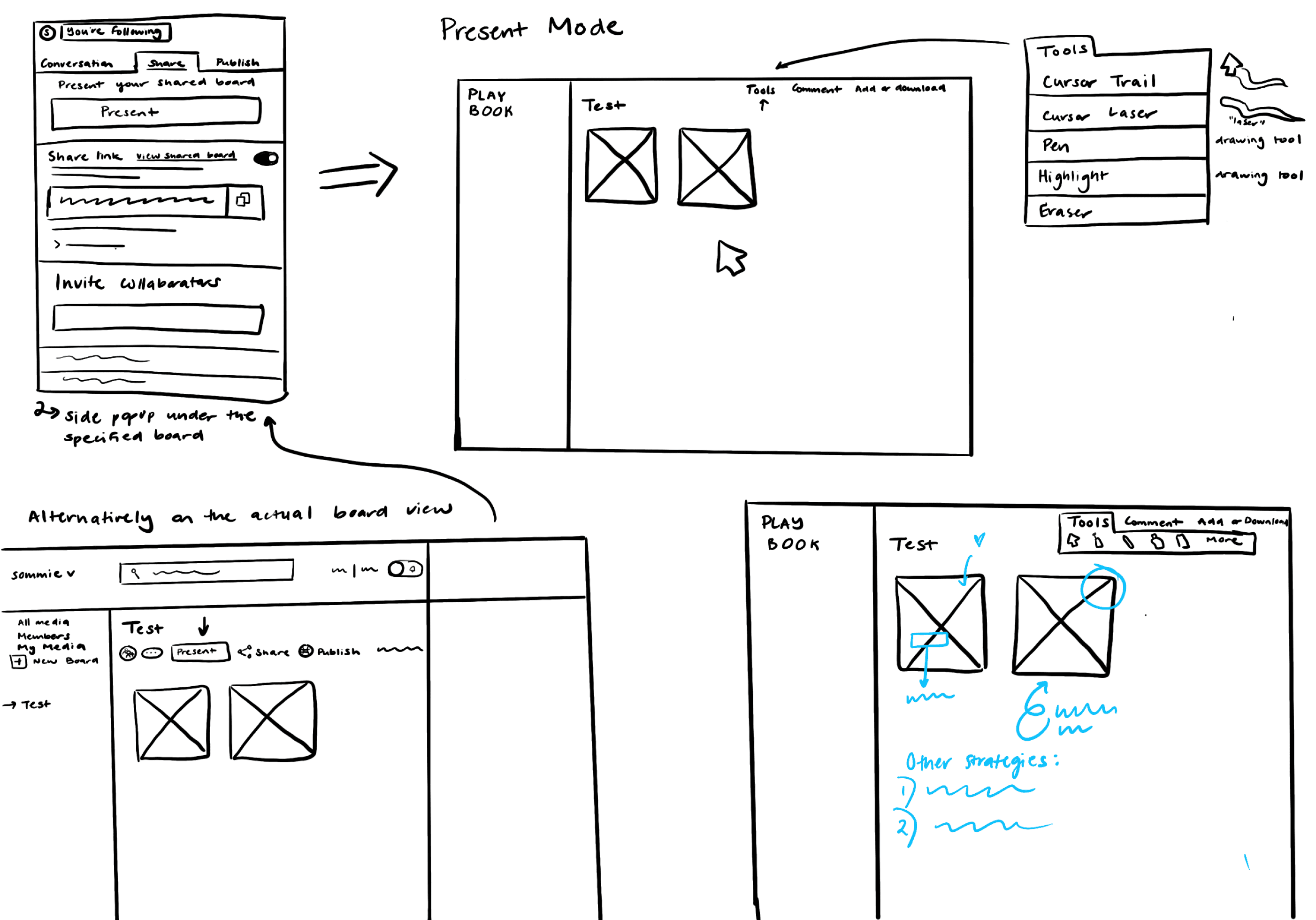
WHITEBOARD/PRESENTATION MODE
Active cursor to follow
Expansion of drawing tools for annotations
Further ideation of this idea with my teammates led to more development the file annotation system as well as expansion of the current commenting capabilities. We explored:
Introduction of voice and video comments, link attachments
Organization of on-file annotations and commenting through history tracking
Customization of on-file annotations (through sizing, color, toggle on/off viewing)

✦ FINALIZED DIRECTION
User flow: putting our ideas into perspective
In order to organize our deliverables and better visualize the flow of expanding editor tools, we envisioned two paths: editing files directly (On-file Markup) and supplemental commenting features on the side panels (Off-file Markup). The following flow outlines the expected actions that users are able to take both as owners and invited collaborators on a file.
Off-File Markup
On-File Markup
Making annotations to the file/canvas directly through use of shapes, lines, pen tool, tool, etc

✦ Solution
Off-file Organization: Preview
This re-design added a preview of the “Conversation Activity” which allows users to peek into the new comments on the file before needing to open it completely.

Crop
Markup
Comment
Berkeley Innovation Proposal Presentation
/
Presentation Here Place Holder
BI x Playbook Master File.pdf
No status
expires
copyright
4MB Uploaded by Andrea Juwono on Mar 8 2024
Originally created on Feb 6 2024
Lorem ipsum dolor sit amet, consectetur adipiscing elit, sed do eiusmod tempor incididunt ut labore et dolore magna aliqua. Ut enim ad minim veniam, quis nostrud exercitation ullamco laboris nisi ut aliquip ex ea commodo consequat.
Leave a comment 💬
Share
Download JPG (1621x1620)
Related
# brown
# brown
# brown
# brown
# brown
# brown
# brown
# brown
# brown
# brown
# brown
# brown
Conversation Activity
View All

Lorem ipsum dolor sit amet, consectetur adipiscing elit, sed do eiusmod tempor incididunt ut labore et dolore magna aliqua.
2 Replies

Lorem ipsum dolor sit amet, consectetur adipiscing elit, sed do eiusmod tempor incididunt ut labore et dolore magna aliqua.
Lorem ipsum dolor sit amet, consectetur adipiscing elit, sed do eiusmod tempor incididunt ut labore et dolore magna aliqua.
Name
Lorem ipsum dolor sit amet, consectetur adipiscing elit, sed do eiusmod tempor incididunt ut labore et dolore magna aliqua.
Reply...
Lorem ipsum dolor sit amet, consectetur adipiscing elit, sed do eiusmod tempor incididunt ut labore et dolore magna aliqua.
2 Replies
Lorem ipsum dolor sit amet, consectetur adipiscing elit, sed do eiusmod tempor incididunt ut labore et dolore magna aliqua.
Lorem ipsum dolor sit amet, consectetur adipiscing elit, sed do eiusmod tempor incididunt ut labore et dolore magna aliqua.
2 Replies
Lorem ipsum dolor sit amet, consectetur adipiscing elit, sed do eiusmod tempor incididunt ut labore et dolore magna aliqua.
2 Replies
Lorem ipsum dolor sit amet, consectetur adipiscing elit, sed do eiusmod tempor incididunt ut labore et dolore magna aliqua.
Lorem ipsum dolor sit amet, consectetur adipiscing elit, sed do eiusmod tempor incididunt ut labore et dolore magna aliqua.
2 Replies
New Activity / Notification Overview
Threaded Comments
Select and Resolved Comments
Off-file organization: Conversation
Addition of new comment features (voice, video, link attachments) as well as activity tracking of on-file annotations/markups (drawings, on-file comments, shapes, etc).

Chip Organization
Traced Markup Activity
Extended “Comment” Options
Markup Associated Comments
On-file Markups: Tools for annotation
Addition of toolbars with on-file cursor and side-panel menu with the ability to toggle the visibility of file annotations.
Crop
Markup
Comment
Annotate here
Markup Tools
Draw
Highlight
Erase
Text
Rectangle
Circle
Arrow
Spline
Pen Size
Opacity
Save annotation
Discard Changes
Toolbar cursor
Flexible Mark Up Tools
draw, highlight, erase, add text, shapes, arrows and lines
Customizable Tools
Toggle Visibility
✦ PROJECTED IMPACT
Detailed, digital record of iterations and feedback
Through these proposed solutions, educational institutions would be able to implement the usage of Playbook as a means of recording and maintaining a history of iterations and feedback received by peers. The features allow peers and reviewers to give more specific feedback on the canvas as well as provide detailed recommendations through links, voice recordings, and comments.
This is valuable in an iterative setting. If time allowed, I would measure this impact by conducting a longitudinal diary study with checkpoints to measure the impact of student feedback and integration of Playbook within a classroom curriculum--where students use this as a submission form and comment on peer work for improvement. This works for digital design and art as well as traditional media that can be uploaded.
✦ FUTURE IMPROVEMENTS
The story isn’t complete... the teacher perspective is missing
Although we designed for collaboration amongst students, teachers are the other part of the educational space that we need to consider when trying to appeal to educational institutions. This is where ideas that fell off during the process, for example presentation mode and version history, may be interesting avenues to start bringing in the teacher perspective to the conversation about collaboration within Playbook.
✦ REFLECTIONS
Scope evolves, lean into it
Insert description and accommodating text here
Iteration informs prioritized flows and features
During the early stages of prototyping, I went straight towards exploring the ways that tool expansion on the “Editor Tools” page would look without thinking larger scale at how this may look on the other pages (“Conversation Tab”). Working with my teammates helped me slow down and evaluate my designs to envision across different user touch points.

ദ്ദി・ᴗ・)✧
ദ്ദി(˃ ᵕ ˂ ദ്ദി)
•ᴗ•
•ᴗ•
•ᴗ•

✦ FINAL WORDS
Thank you Playbook!
As my first ever UX consulting project, I was extremely grateful and humbled by the flexibility and support that I was given through the mentorship of the Playbook team. It provided me with my first insight into industry.
Special thank you to Andrea J. from Playbook who not only provided us with incredibly helpful and constructive feedback throughout the process but also which allowed me to get a taste of industry experience both through the work she challenged us with and providing us a company tour in San Francisco! Thank you Andrea!